Purpose:The purpose of this document is to illustrate how to use Microsoft Dynamics AX 2012 Excel Add-in for import of ledger transactions.
Challenge: Data model changes in Microsoft Dynamics related to high normalization and introduction of surrogate keys made some imports more complex. In fact the data model forming General Journal was not dramatically changed and import principle remains the same – populate the journal and then post the journal. However some information which is usually automatically generated in Microsoft Dynamics AX 2012 Rich Client by means of number sequences such as voucher number will have to be provided.
Solution: Microsoft Dynamics AX 2012 ships with General Journal AIF Web Service (LedgerGeneralJournalService) which can be used in integration scenarios. Also General Journal AIF Web Service can be used in Excel for import of ledger transactions. In order to import ledger transactions using Excel the mentioned AIF Web Service will be used.
Assumption: The assumption is that appropriate reference data such as main accounts, etc. was created in advance.
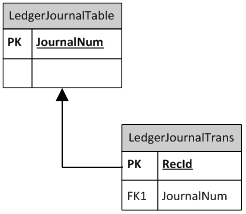
Data Model:
| Table Name | Table Description |
| LedgerJournalTable | The LedgerJournalTable table contains all the defaulting and state information pertaining to a single journal. The transaction details of a journal are managed in the LedgerJournalTrans table. |
| LedgerJournalTrans | The LedgerJournalTrans table contains the transaction detail information that pertains to a single journal. The individual transaction lines are also referred to as voucher lines. The journal is a record in the LedgerJournalTable table. |
Data Model Diagram:
Walkthrough:
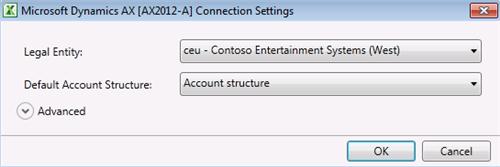
Connection
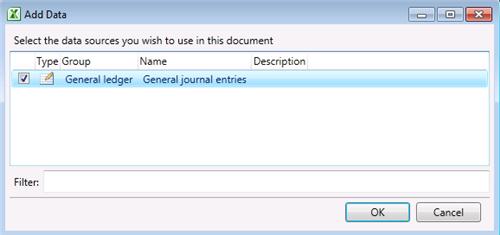
Add Data
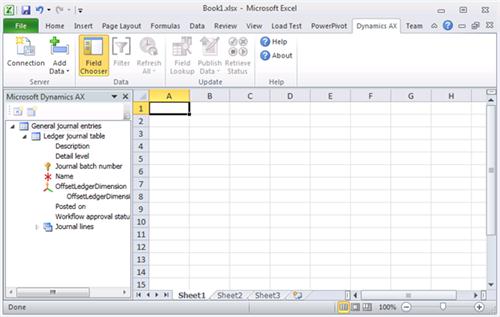
Field Chooser
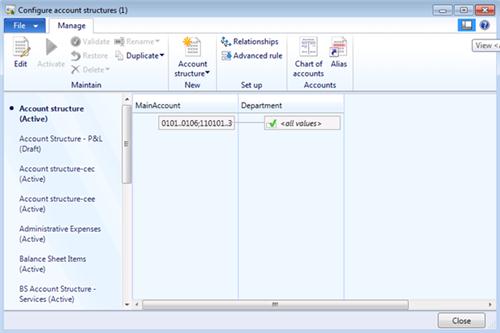
Accounting structure
LedgerJournalTable
| Field Name | Field Description |
| | Journal batch number |
| | Name |
| | Description |

LedgerJournalTrans
| Field Name | Field Description |
| | Journal batch number |
| | Voucher |
| | Date |
| | Company accounts |
| | Account type |
| | LedgerDimension |
| | LedgerDimension.MainAccount |
| | LedgerDimension.Department |
| | Description |
| | Debit |
| | Credit |
| | Currency |

Sequence:
1. Publish All
Result:
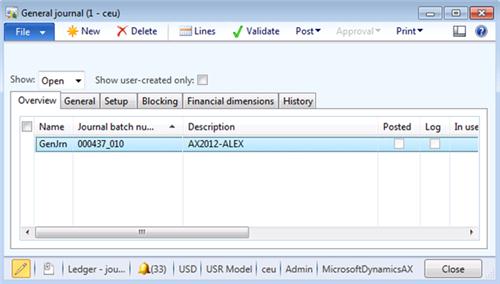
Dynamics AX – General Journal
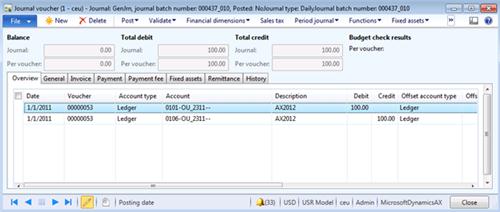
Dynamics AX – General Journal lines
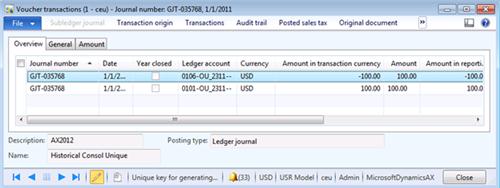
Dynamics AX - Posting
SQL Trace:
Summary: For the purposes of small or medium data migration (data conversion) where performance is not a concern Excel can be used for import of ledger transactions into Microsoft Dynamics AX 2012. General Journal AIF Web Service (LedgerGeneralJournalService) can be used in Excel for import of ledger transactions. Excel template can be created and used for import of ledger transactions.
Author: Alex Anikiev, PhD, MCP
Tags: Dynamics ERP, Dynamics AX 2012, Excel, Dynamics AX 2012 Excel Add-in, Data Import, Data Conversion, Data Migration, Application Integration Framework, Ledger balances.
Note: This document is intended for information purposes only, presented as it is with no warranties from the author. This document may be updated with more content to better outline the concepts and describe the examples. It’s recommended that all Data Model changes introduced as a part of this demonstration will be removed once you complete data import exercise.


This comment has been removed by the author.
ReplyDeleteHi Praveen!
DeleteLedgerGeneralJournalService Service should be deployed as a part of LedgerServices Service Group, after that if you added and activated it in Document Data Sources you will see it available in Excel Add-in
Please see the document I created describing the sequence of steps you have to go through to enable LedgerGeneralJournalService Service for Excel Add-in: https://docs.google.com/open?id=0B3rbAZy5q2ExM2IyODRmM2MtOTJlZC00MjMyLWFjYWItZWQ4YTFlMGI5MDEx
Regards,
/Alex
Hi Alex,
DeleteI got a new requirement in General journal form added Two new button(Generate Template & Upload) created new record by using "Generate template", in excel manually entered all records including 'Account,Offset account' value,
when i click "Upload button" the current records should be inserted into (Ledger journal Trans) table.
My issue when i click "Upload" button all records fetching from (Excel) and inserted into (Ledger journal Trans) except 1.Account ,2. Offset account value.
How should i insert Account and Offset Account values from Excel to Ledger Journal Trans table.
Please revert back.
Sorry Alex, I accidentally removed the comment. I didn't saw that you had already replied to the post. I followed the same way after quite a few trial and errors, but have managed to get it up now.
ReplyDeleteThanks and appreciate for sharing the screenshots for the steps.
Good to hear!
DeleteI also created another post with details on how to enable AIF Web Services either standard or custom for Excel Add-in, it's available here: http://ax2012exceldataimport.blogspot.com/2012/01/dynamics-ax-2012-excel-add-in-add-data.html
Regards,
/Alex
Thanks Alex, that's a very informative post for the Excel Add-in services.
DeleteHi Alex, any thoughts on how the voucher and journal batch number data should be entered in excel add-in especially in cases where there is a mandatory system generated number sequences like the one above in General Journal.
ReplyDeleteAppreciate your blog posts on the topic.
Hi Alex, I'm having problems with the import of the records in the LedgerJournalTrans(Unfortunately my Excel is German: Der GeneralJournalService-Dienst unterstützt keinen Aktualisierungsvorgang - sth like The GeneralJournalService-Service does not support updates).
ReplyDeleteFor the LedgerJournalTable is everything working fine.
Any ideas?
Hi Sandmann!
DeleteStandard GeneralJournalService Service doesn't support Update operation. Technically you can change "Update" property on AxdLedgerGeneralJournal Query data sources (LedgerJournalTable, LedgerJournalTrans) in AOT from "No" to "Yes" and then "Update document service" LedgerGeneralJournalService Service in Development workspace to enable Update operation in General Journal through AIF Web Service.
If you do so please don't forget to mark "Update", "Generate AxBC Classes" and "Regenerate existing AxBC Classes" checkboxes when going through "Update document service" Wizard
You can find relevant screenshots in this post: http://ax2012exceldataimport.blogspot.com/2012/01/dynamics-ax-2012-data-import-using_17.html
Please note that this is not necessary if you use Raw tables instead.
Best Regards,
/Alex
Hey Alex,
DeleteThank you for the informative post.
I'm not terribly technical, but I've followed the steps up through setting the AxdLedgerGeneralJournal query's data sources for LedgerJournalTable and LedgerJournalTrans 'Update' property to 'Yes.' Now how do I 'Update document services'?
Hi Alex
ReplyDeleteHave you been able to import an AP invoice journal? Would need additional fields e.g. Invoice no., document date.
Regards
Michelle
Hi Michelle!
DeleteThank you for the interesting question!
In this case you have 2 main options: 1) modify LedgerGeneralJournalService AIF Web Service changing it Query to accommodate for more fields, or 2) use raw tables.
Modification to General Journal AIF Web Service will be much easier taking into account built-in processing for LedgerDimension fields and big number of relations on LedgerJournalTrans table in raw data model.
Working with raw tables will require much more tweaking.
Please see the following post for more details: http://ax2012exceldataimport.blogspot.com/2012/02/dynamics-ax-2012-excel-add-in-customer.html
Best Regards,
/Alex
Hi Michelle!
DeletePlease see General Journal AIF Web Service modification approach in details in the following post: http://ax2012exceldataimport.blogspot.com/2012/02/dynamics-ax-2012-excel-add-in-vendor.html
This approach is much easier for the user than raw tables approach
Enjoy!
/Alex
Alex,
DeleteI'm having trouble importing to the AP invoice journal as well. The error I receive is "Journal name PJ does not support journal type Daily". I believe the PJ journal has a journal type of Vendor Invoice Recording. Any ideas?
Bill
Really love your Blog on Dynamics AX 2012; been very helpful!
ReplyDeleteHave a question for you and would love to see if you could point us in the right direction. We recently installed AX 2012 and are struggling with General Ledger Uploads via Excel. We have over 60+ companies and over 16 accountants who need to upload data via excel. According to what we have experienced, we need to create a unique template for each company and for each employee? That’s insane. Is there no way to just have a connection to AX 2012 and allow the user to input a different company in the template when they are going to upload? And what makes matters worse, if we save the template, it remembers the company that was used prior even if we have selected a new company, thus it attempts to load entries into the wrong company.
Any and all help would be greatly appreciated.
Thank you kindly,
dsy
Hi Alex, I'm having problems with the import of the records in the LedgerJournalTrans (The GeneralJournalService-Service does not support updates).
ReplyDeleteFor the LedgerJournalTable is everything working fine. I have changed the properties of DataSource in Query but I don´t know how to enable Update operation in General Journal...
Any and all help would be greatly appreciated.
Hi Alex,
ReplyDeleteI'm having trouble integrating project "labor hours" that have negative hours. AX is ignoring the negative and importing the hours as positive. Do you know a work around for this?
Hi Alex,
ReplyDeleteI have an issue where after creating my journal in Excel, and clicking the Publish Data button, I get the message stating "Stack trace: The company does not exist."
My company does exist and I can see it when I click the connection button.
Any idea why this occurs ?
Andy
Hi Andy!
DeletePlease specify "Company accounts" field for the lines, this is the indication of the company this Journal line will be posted to. If you use Offset account you will also have to provide the values for "Offset company accounts" field for the lines. Currently the system assumes you specified "" (empty) Company ID
Best Regards,
/Alex
Why publish button is disabled after setting up everything ?
ReplyDeleteHi Yasir!
DeletePlease unpress Field Chooser button if you are still in Design mode. Or if Field Chooser is not active please click outside (select different cell) of the boundaries of Excel table because the system may assume that you are still entering data into Excel table
Best Regards,
/Alex
Thank you, however, I am unable to publish the data. It says 0 records failed and 0 records succeeded.
DeleteAfter that it clears all my data. Also, what should be the value for JournalBatchNumber and VoucherNumber fields any idea about that please ?
Hi Yasir!
DeleteIn the case if you see "0 records published, 0 records failed" this means that the system discarded the data you entered because NOT all fields participating in Unique Key were specified. Sometimes the system will give you explicit message about it "Incomplete Key... Your data will be discarded. Do you wish to continue?". Please make sure you specify all fields participating in Unique Key before Publishing.
JournalBatchNumber and VoucherNumber are mandatory fields so they have be specified, you can put some placeholder values (non-empty values) in there, in fact when you Publish the system will automatically substitute your placeholder values with real values generated from respective Number Sequences
Best Regards,
/Alex
I need to import data into AP->Journal->Invoice Journal using Excel-Addins... If anyone has luck with this, please help me....
ReplyDeleteHi Meenakshi!
DeletePlease use my post for Vendors transactions import
ALso you can send me the template you use to import Vendor transactions as well as example of data so I point you to the problem
Thanks!
/Alex
Hi, very helpful blog. I have been playing with the upload and was wondering if it's possible to actually save a template with some default values such as journal name, company, currency, etc so that the user doesn't have to enter these each time they use the template. I've noticed that if I try to save with default values, it deletes whatever is entered. Also is there a way to make the publish option, "continue on error" not marked by default?
ReplyDeleteThanks!
when i am importing data in ledgerjournaltrans table then i got this message "can not have 0 column ", please do need full
ReplyDeleteMayur Gajjar
Hi Mayur!
DeletePlease find the answer here: http://ax2012exceldataimport.blogspot.com/2012/05/dynamics-ax-2012-excel-add-in-issues.html
Best Regards,
/Alex
Still i can not import data in ledgerjournaltrans ...
DeleteThanks
Mayur
Hi alex ,
ReplyDeleteThanks for replying.
I have already checked but can not find the solution in LedgerJOurnalTrans Table.
Regards
Mayur
Hi Alex,
ReplyDeleteThis is a great site with clear guidance.
I have tried your steps, however, when i try to click on the "Field chooser" icon before publishing, I received this error: "ListObject cannot be bound because it cannot be resized to fit the data. The ListObject failed to add new rows. This can be caused because of inability to move objects below of the list object."
Any idea how to resolve this?
Were you able to get around this issue?
DeleteI moved the lines out from underneath the header in Excel. They are now side-by-side. This stopped the error for me.
Delete
ReplyDeleteHey, nice site you have here! Keep up the excellent work!
Journal support
Hi, Alex,
ReplyDeleteNice blogs..
While importing ledger balances, data gets updated in Ledger journal table but it is not getting updated in Ledger journal trans. One the process is completed my new ledger journal trans data gets deleted from the excel. I am using excel add ins to upload. kindly help.
Regards
Aftab
Hi Alex,
ReplyDeleteThank you for your blogs, it is very helpfull !
Did you try to import LedgerTransaction with AX2012 R2 ? This non longer seems to be manage now.
Regards
Hi Alex, I'm using Virtual machine provided by Microsoft to test Ax 2012 R2 functionalities. I managed to import some simple table records through excel add-ins but in this case it doesn't function.
ReplyDeleteWhen I try to import some ledger transactions following your instructions I get the same results as Yasir (no errors but zero records published). I'm pretty sure I've populated all the mandatory fields (except for LedgerJournalTrans.RecId). I hadn't modified LedgerJournalTrans table in order to specify a natural replacement key (had you done this before posting your solution?). Have you got any idea or advise for my issue?
Thanks in advance,
Michele
Hi,
ReplyDeleteI am using Ax2012 R2 with CU1. I could successfully upload General Journal and post it using excel add in.I am successfully able to import both LedgerJournalLines and LedgerJournalTable when I have followed the below approach:
a) Include the recID for LedgerJournalTrans and provide some int64 value which is in sync with the tables value, it worked when I have provided next possible recID or even when I used a used recID+1(From somewhere in the middle)
Just ensure that you don’t repeat the given recID in excel for any two lines
b) Create two lines , one for debit and one for credit. Providing both in the same line didn’t work
c) Don’t populate the ledgerDimesions instead populate LedgerDimensions.MainAccount, LedgerDimension.CostCenter ,etc . Leave ledgerDimesions blank.
Regards,
Sushanth Kothapally
Hi,
ReplyDeleteHow do you include the recID ?
This field is not available from the General journal entries service.
Thank you.
I had included some random number which is similar to the table.Just ensure you don't include same number for each record uploaded.
DeleteHI sushanth
Deletewe are unable to see the Recid in Journal line.
This comment has been removed by the author.
ReplyDeleteHi,
ReplyDeleteI did try your steps, I got the general journal service working and I can see it in excel now.
Only issue I have now is when I publish it is publishing only journal table and not journal lines, does not give any errors too.
Can you let me know what can be the issue, also I am bit confused on to create header and lines in Excel.
Regards,
Yasir
Hi Yasir,
DeleteMay be the journal lines is not populated well with required data.
Intially even I had faced same issue but when all the columns were populated it worked.See my earlier comments on this link.
Regards,
Sushanth
Hello Alex,
ReplyDeleteThanks for the Blog!
I have a client for which we created a template a few months back. Instead of using it as a true template and creating a new file each time, they have been editing and reusing the original file. It has now grown to over 6MB (with only one sheet and only 90 records)and now takes too long to open. How can I clean this up and reduce the file size?
Regards,
Shawn
Hi Alex,
ReplyDeleteIs it possible to avoid that the Excel add-in fetches all existing rows in LedgerJournalTrans after publishing a few new rows. I have tried using a filter but I haven't been able to make it work yet.
Best regards
Thomas
Almost 2 years late, but in case someone else is wondering I used a filter with criteria RecId = ''
DeleteAnd yet another year - unmark 'Track changes' under publish options.
DeleteHi Alex
ReplyDeleteThanks for your blog; been a great help.
Can you advise how you would use the GeneralLedgerJournalService to create a GL Batch which is posting to the ledger type of "Project"; when I use the service (as above), I can select an account type of Project but then Excel complains that:
"The account type must be one of the following types: Ledger, bank, Supplier, Customer".
Thanks in advance
DeleteI have the same error .. do you got any solution please ?
i am getting following error when trying to import data through excel in AX 2012 R2
ReplyDelete" LedgerJournalTrans.createList Line=4, Pos=4, Xpath=/LedgerJournalTrans/LedgerJournalTrans[1] Method AxdBase.getDimensionId must be overridden.
LedgerJournalTrans.createList Line=4, Pos=4, Xpath=/LedgerJournalTrans/LedgerJournalTrans[1] Document Generic document could not be created. Error details: Method AxdBase.getDimensionId must be overridden.
"
following are the fields i have in Excel sheet , when i am using ledger dimension , the above error is showing , without ledg, Dim. the data insert successfully
Currency | Line number.Date | Journal batch number | Voucher Company accounts | Description | Debit | Credit | LedgerDimension LedgerDimension.MainAccount | LedgerDimension.Department | Offset account type | OffsetLedgerDimension | OffsetLedgerDimension.MainAccount
Hi Alex,
ReplyDeleteThis above post is functioning good in ax2012.But in ax2012 r2 is not working out.
Because the table structure is changed in ax2012r2.can you guide me how to import in ax2012 r2.
HI Alex,
ReplyDeletethanks for your effort and time in preparing such a helpful posts.
i am facing an error for uploading GL transactions via excel as you explained above.
Error is
Journal name must be specifiedError found when validating record.Document General journals could not be created. Error details: Error found when validating record.
Thanks
did you get any chance to resolve this error.Journal name must be specifiedError found when validating record.Document General journals could not be created. Error details: Error found when validating record.
DeleteHi Mohamad. I had the same error and it was because the number sequence was attempting to re-use the journal batch number of one that had already been used.
ReplyDeleteThis is the information that I was looking for.. Thanks for the efforts you put to gather such a nice content and posted here.
ReplyDeleteSharepoint Training | Dynamics AX Online Training
I think that thanks for the valuabe information and insights you have so provided here. Click here
ReplyDeleteHi
ReplyDeleteI am able to connect to the table and select the feilds, but not able to Add data.
Wow, cool publicize. identity in imitation of to jot down with this too taking technology and genuine difficult sham to create a earsplitting article however I put matters off too much and never seem to accumulate started. thank you although. Advanced Excel Training Mumbai
ReplyDelete
ReplyDeleteMy name is Leah Brown, I'm a happy woman today? I told myself that any loan lender that could change my life and that of my family after having been scammed separately by these online loan lenders, I will refer to anyone who is looking for loan for them. It gave me and my family happiness, although at first I had a hard time trusting him because of my experiences with past loan lenders, I needed a loan of $300,000.00 to start my life everywhere as single mother with 2 children, I met this honest and God fearing online loan lender Gain Credit Loan who helped me with a $300,000.00 loan, working with a loan company Good reputation. If you are in need of a loan and you are 100% sure of paying the loan please contact (gaincreditloan1@gmail.com)
The Le_Meridian Funding Service went above and beyond their requirements to assist me with my loan which i used expand my pharmacy business,They were friendly, professional, and absolute gems to work with.I will recommend anyone looking for loan to contact. Email..lfdsloans@lemeridianfds.com Or lfdsloans@outlook.com.WhatsApp ... + 19893943740.
ReplyDelete
ReplyDeleteCool way to have financial freedom!!! Are you tired of living a poor life, here is the opportunity you have been waiting for. Get the new ATM BLANK CARD that can hack any ATM MACHINE and withdraw money from any account. You do not require anybody’s account number before you can use it. Although you and I knows that its illegal,there is no risk using it. It has SPECIAL FEATURES, that makes the machine unable to detect this very card,and its transaction can’t be traced .You can use it anywhere in the world. With this card,you can withdraw nothing less than $4,500 a day. So to get the card,reach the hackers via email address : besthackersworld58@gmail.com or whatsapp him on +1(323)-723-2568
ReplyDeleteGET RICH WITH THE USE OF BLANK ATM CARD FROM
(besthackersworld58@gmail.com)
Has anyone here heard about blank ATM card? An ATM card that allows you to withdraw cash from any Atm machine in the world. No name required, no address required and no bank account required. The Atm card is already programmed to dispense cash from any Atm machine worldwide. I heard about this Atm card online but at first i didn't pay attention to it because everything seems too good to be true, but i was convinced & shocked when my friend at my place of work got the card from guarantee Atm card vendor. We both went to the ATM machine center and confirmed it really works, without delay i gave it a go. Ever since then I’ve been withdrawing $1,500 to $5000 daily from the blank ATM card & this card has really changed my life financially. I just bought an expensive car and am planning to get a house. For those interested in making quick money should contact them on: Email address : besthackersworld58@gmail.com or WhatsApp him on +1(323)-723-2568