Purpose:The purpose of this document is to illustrate how to use Microsoft Dynamics AX 2012 Excel Add-in for import of customers.
Challenge: Data model changes in Microsoft Dynamics related to high normalization and introduction of surrogate keys made import of customers more complex. In order to create a customer in Microsoft Dynamics AX 2012 both customer and party information will have to be provided. Additionally some information which is usually automatically generated in Microsoft Dynamics AX 2012 Rich Client by means of number sequences such as customer number will also have to be provided.
Solution: Microsoft Dynamics AX 2012 ships with Customer AIF Web Service (CustCustomerService) which can be used in integration scenarios. However Customer AIF Web Service can’t be used in Excel at the moment for import of customers. In order to import a customer with communication details and address information using Excel the appropriate tables will be used.
Assumption: The assumption is that appropriate reference data such as customer groups, etc. was created in advance.
Data Model:
| Table Name | Table Description |
| CustTable | The CustTable table contains a list of customers for the accounts receivable and customer relationship management. |
| DirAddressBook | The DirAddressBook table contains address book records. |
| DirAddressBookParty | The DirAddressBookParty table is a relationship table that contains a link between an address book and party records. |
| DirPartyTable | The DirPartyTable table contains all the parties. The global address book stores all of the people and organizations that are used in the system. |
| DirPerson | The DirPerson table contains the party records of person. |
| DirOrganizationBase | The DirOrganizationBase table contains definitions for internal and external organizations. |
| DirOrganization | The DirOrganization table contains details for the external organizations in the system. |
| DirPersonName | The DirPersonName table contains the date effective names for each person in the system. |
| DirOrganizationName | The DirOrganizationName table contains the date effective names for each of the organizations in the system. |
| DirDunsNumber | The DirDunsNumber table contains definitions of the DUNS numbers. |
| DirNameAffix | The DirNameAffix table contains the name titles and suffixes that are defined in the system. |
| LogisticsLocation | The LogisticsLocation table contains the attributes for a location for postal address and contact information. |
| LogisticsLocationExt | The LogisticsLocationExt table contains additional information about the locations. |
| LogisticsLocationRole | The LogisticsLocationRole table contains the roles that are played by the locations in the system. |
| LogisticsLocationRoleTranslation | The LogisticsLocationRoleTranslation table contains the translation values for the location role descriptions in the languages that are supported in the system. |
| DirPartyLocation | The DirPartyLocation table contains the relationship between the party and location. |
| DirPartyLocationRole | The DirPartyLocationRole table is the relationship table between the location and function of the party. |
| LogisticsElectronicAddress | The LogisticsElectronicAddress table contains communication values that are defined for various parties. |
| LogisticsPostalAddress | The LogisticsPostalAddress table contains addresses in the system that could be associated with various entities. |
| LogisticsAddressCountryRegion | The LogisticsAddressCountryRegion table contains definitions of countries or regions. Addresses are associated with countries and regions through CountryRegionId field. |
| LogisticsAddressCountryRegionTranslation | The LogisticsAddressCountryRegionTranslation table contains the translations of the country region long and short names. |
| LogisticsAddressState | The LogisticsAddressState table contains states that are used by addresses. |
| LogisticsAddressCounty | The LogisticsAddressCounty table contains definitions of counties. |
| LogisticsAddresssCity | The LogisticsAddresssCity table contains the definitions of the cities. |
| LogisticsAddressDistrict | The LogisticsAddressDistrict table contains the definitions of the districts. |
| LogisticsAddressZipCode | The LogisticsAddressZipCode table contains zip codes that can be used by addresses. |
Data Model Diagram:
Global Address Book

VSD: https://docs.google.com/open?
Red area highlights tables forming Address book – Person data model
Green area highlights tables forming Address book – Organization data models
Yellow area highlights tables implementing Electronic Address data model
Blue area highlights tables implementing Postal Address data model
Customers

Walkthrough:
Connection
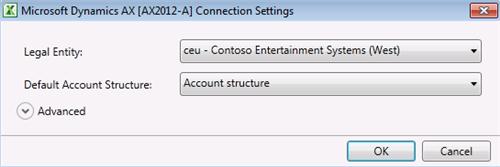
Add Data

Dynamics AX Error

Add Tables

Field Chooser

CustTable
| Field Name | Field Description |
| | Currency |
| | Customer account |
| | Customer group |
| | Name.Party ID |

Customer account – Number sequence

DirPartyTable (Person)
| Field Name | Field Description |
| | Name |
| | Party ID |
| | Party type |
| | Display as |

Address book ID – Number sequence

LogisticsLocation
| Field Name | Field Description |
| | Location ID |
| | Name or description |
| | Postal address |

DirPartyLocation
| Field Name | Field Description |
| | Effective: |
| | Location.Location ID |
| | Name.Party ID |
| | Expiration: |
| | Postal address |

DirPartyLocationRole
| Field Name | Field Description |
| | Location role.Role |
| | Party location relationships.Effective: |
| | Party location relationships.Location ID |

LogisticsPostalAddress
| Field Name | Field Description |
| | Country / region |
| | Effective: |
| | Location.Location ID |
| | State |
| | County |
| | City |
| | District |
| | Street |
| | ZIP / postal code |
| | Expiration: |

LogisticsElectronicAddress
| Field Name | Field Description |
| | Effective: |
| | Location.Location ID |
| | Type |
| | Contact number / address |
| | Expiration: |


Sequence:
1. DirPartyTable – Publish Selected
2. LogisticsLocation – Publish Selected
3. DirPartyLocation – Publish Selected
4. DirPartyLocationRole – Publish Selected
5. LogisticsElectronicAddress – Publish Selected
6. LogisticsPostalAddress – Publish Selected
7. CustTable – Publish Selected
Result:
Dynamics AX – Address book

Dynamics AX – Address book Address

Dynamics AX – Address book Contact information

Dynamics AX – Customer

Dynamics AX – Customer Address

Dynamics AX – Customer Contact information

SQL Trace:
Summary: For the purposes of small or medium data migration (data conversion) where performance is not a concern Excel can be used for import of customers into Microsoft Dynamics AX 2012. Although Customer AIF Web Service (CustCustomerService) can’t be used at the moment in Excel for import of customers, appropriate tables can be used instead. Excel template can be created and used for import of customers.
Author: Alex Anikiev, PhD, MCP
Tags: Dynamics ERP, Dynamics AX 2012, Excel, Dynamics AX 2012 Excel Add-in, Data Import, Data Conversion, Data Migration, Application Integration Framework, Customers.
Note: This document is intended for information purposes only, presented as it is with no warranties from the author. This document may be updated with more content to better outline the concepts and describe the examples. It’s recommended that all Data Model changes introduced as a part of this demonstration will be removed once you complete data import exercise.


Alex,
ReplyDeleteNice post. But when I try to add table LogisticsPostalAddress in the forth step I received a message error that "The table [LogisticsPostalAddres] has a surrogate foreign key expansion errors: LogisticsAddressCity, LogisticsAddressDistrict, LogisticsAddressZipCode dosnot have a replacement key.
Hi Orlando!
DeletePlease add mentioned below Replacement keys to the following tables to get LogisticsPostalAddress table successfully added to Excel Add-in:
- LogisticsAddresssCity table, Replacement key = Index1 {Name, RecId}
- LogisticsAddressDistrict table, Replacement key = Index1 {Name, RecId}
- LogisticsAddressZipCode table, Replacement key = Index1 {ZipCode, RecId}
Please Refresh Dictionary in Development workspace after you add Replacement keys to tables, and restart Excel
Please see your options as it relates to Replacement keys in this post:http://ax2012exceldataimport.blogspot.com/2012/01/dynamics-ax-2012-excel-add-in.html
Best Regards,
/Alex
You may also look into below link to resolve index issue.
Deletehttp://eprogrammers.blogspot.com/2011/12/data-import-error-in-microsoft-dynamics.html
This comment has been removed by the author.
DeleteHi Alex,
ReplyDeleteThis is a nice post. Did you try if a customer has more than one contact then how to import using Excel Add-in?
hi alex,
ReplyDeleteYou're GREAT!!!
Thank you and Rajesh!
ReplyDeleteHi,
ReplyDeleteWhile loading the data, i am getting an error for Surrogate key in LogisticsPostalAddress table.
I would like to know how to add surrogate key for its connected tables.
Thanks,
Yash
This comment has been removed by the author.
ReplyDeleteAlex,
ReplyDeleteThanks for doing these blogs. Have been a big help.
I believe that you did the initial article before Feature Pack 1 came out. Has FP1 improved the use of the Excel add-in?
Thanks!
Paul S.
Hi Alex,
ReplyDeleteThank you for this blog, it has been very helpful.I have a question. I can see by the error message which table I have to place the foreign key, but I do not know which fields must have the new Index. Is there a way to know the fields I have to setup to fix this kind of error?
Thank you in advanced
Miguel
Alex.... I dont how to say thanks to you....
ReplyDeleteYou are "GENIUS" in AX
Hello ALex,
ReplyDeleteHow can import the customer table and Dirpartytable but with auto generated numbers for customer account and party id according to the number sequence assigned in the parameters?
I am getting below error. any idea
ReplyDeleteThe request failed with the following error: Invalid document schema. The following error was returned: The element 'DirPartyLocation' in namespace 'http://schemas.microsoft.com/dynamics/2008/01/documents/Party' has invalid child element 'LogisticsLocation' in namespace 'http://schemas.microsoft.com/dynamics/2008/01/documents/Party'. List of possible elements expected: 'Location' in namespace 'http://schemas.microsoft.com/dynamics/2008/01/documents/Party'.
Hi Alex,
ReplyDeleteI can import customer list. everything is fine and display on form. however, i dont know why everytime i try to import DirPartyLocationRole table, system didnt show any error message but all data also didnt import. no successful or fail record and no new line was imported into table. What happend to it? can you help me? i just want to know there is any problem if i use this customer list or vendor list for any transaction.
Im waiting for your support
Thank you very much
Rabia
Hi Alex,
ReplyDeleteHow can import multiple postal address in different location id using Excel. I'm created multiple Location id for a particular Party id and posted data successfully. But it won't be published in ax2012.
Please help me as soon as possible.
Thanks and Regards,
Sathish.
Hi
ReplyDelete1) How to get excel template for "Employees" and related tables.
2) How to get excel template for "Fixed Assets" and related tables
can you provide any relational diagram for both of the above master data.
Hussain Ali
How can a new contact be created using aif web service c#. I have create a new person to add to the contact but I am not sure how to? Any answers?
ReplyDeleteHello Alex,
ReplyDeleteHow do I import the contact person for customer, Dynamics AX 2012 RTM
after addition of tables in excel while clicking on "Fields" button system is giving error "'you must include at least 2 items in any list used for updating data" can any body help
ReplyDeleteHi!
DeletePlease add at least 2 fields into a table to bypass this error
For example, when you add CustGroup table in Add Table by default the system will insert "Customer group" field into Excel table structure. All you need to do is to at least drag one more field, say "Default tax group". This is the requirement in Excel Add-in
Best Regards,
/Alex
Hi Alex Anikiev,
ReplyDeletei have a problem to create customer in Microsoft Dynamics with AIF, i want to assign the name for AddressBook in customer other information.
Which file i need to assign the value to populate the data in to that.
Thanks,
Sri
Hi Alex, great post. Despite being a year old, this post still remains holistically pretty valuable. My only request of you would be to kindly post a better resolution entity relation diagram above, or perhaps point us to where it can be found on-line. Thanks // Denis
ReplyDeleteHere is the investors contact Email details,_ lfdsloans@lemeridianfds.com Or Whatsapp +1 989-394-3740 that helped me with loan of 90,000.00 Euros to startup my business and I'm very grateful,It was really hard on me here trying to make a way as a single mother things hasn't be easy with me but with the help of Le_Meridian put smile on my face as i watch my business growing stronger and expanding as well.I know you may surprise why me putting things like this here but i really have to express my gratitude so anyone seeking for financial help or going through hardship with there business or want to startup business project can see to this and have hope of getting out of the hardship..Thank You.
ReplyDeleteI'M NOW FULFILL FINANCIALLY BECAUSE OF THE LOAN I GOT FROM LFDS .I would like to bring this to the notice of the public about how i came in contact with LFDS after i lost my job and being denied loan by my bank and other financial institution due to my credit score. I could not pay my children's fees. I was behind on bills, about to be thrown out of the house due to my inability to pay my rent, It was during this period my kids were taken from me by foster care. Then i set out to seek for funds online where i lost $3,670 that i borrowed from friends which i was rip off by two online loan companies. Until i read about:Le_Meridian Funding Service (lfdsloans@outlook.com / lfdsloans@lemeridianfds.com) somewhere on the internet, Still wasn't convince because of what i have been through until a relative of mine who is a clergy also told me about the ongoing loan scheme of LFDS at a very low interest rate of 1.9%% and lovely repayment terms without penalty for default of payment. I have no choice than to also contact them which i did through text +1-989-394-3740 and Mr Benjamin responded back to me That day was the I'M best and greatest day of my life which can never be forgotten when i receive a credit alert of $400,000.00 Usd loan amount i applied for. I utilized the loan effectively to pay up my debts and to start up a business and today i and my kids are so happy and fulfill. You can as well contact them through email: (lfdsloans@outlook.com / lfdsloans@lemeridianfds.com) WhatsApptext helpline: +1-989-394-3740 Why am i doing this? I am doing this to save as many that are in need of a loan not to be victim of scams on the internet. Thanks and God bless you all, I'm Oleksander Artem from Horizon Park BC , Ukrain.
ReplyDelete